Tree survey software
Tree survey software for UK arborists
ARB-FLO records tree surveys and inspections on site, on a phone, and turns the record you approve into a numbered PDF report. This page sets out what it does today, where it stops, and how to try it.
Who it is for
People who inspect trees and answer for the report, working in British English and metric units:
- Independent arborists who survey, review and report from one phone, and sign their own declaration.
- Arboricultural consultancies that want one defect vocabulary and one report structure across every survey.
- Tree surveyors who need structured records, photographs and positions without slowing down on site.
- Larger practices with systems of their own, which can take the survey data through a documented REST API.
Recording a survey on site
- 1
Set up the project once
Client, site, date, weather and the inspecting arborist are recorded before the first tree, and carried onto every page of the report.
- 2
Record each tree as structured data
Reference, species, age class, stem diameter, height and crown spread are fields, not free text. Defects are chosen from the knowledge-base library, each with a severity, and you can note what a tree could affect, such as a footpath.
- 3
Keep position, photographs and notes with the tree
Take a GPS fix with its accuracy shown, or type the coordinates in. Add base, stem and canopy photographs and a voice note. Speak your findings and ARB-FLO proposes values quoted from your words; anything uncertain is marked for you to confirm.
Voice notes are kept for your reference and never appear in the report. See how voice capture works.
Working without signal
ARB-FLO is a progressive web app. Survey data is saved on the device first, and each change is queued and replayed in order when a connection returns, so a retry never creates a duplicate tree. A sync screen shows what is waiting, and lets you retry or discard a change the server rejected.
Works with no signal
- Create and edit projects and trees
- Record GPS position, dimensions and defects
- Add photographs
- Record voice notes
- Open projects and trees already loaded on the device
Needs a connection
- Turning a recording into tree data
- Drafting the report wording
- Approving a tree
- Generating a report
- Reopening a tree created offline, until it has synced
From reviewed findings to an issued report
Nothing is issued until you have reviewed and approved it. For each tree:
- Recorded facts are shown as you entered them, so you review what you saw rather than a summary of it.
- Candidate works come from fixed knowledge-base rules and show their reasoning. Where no rule applies, none is invented.
- Report wording can be drafted with AI from the recorded facts only, checked against the record and labelled as a draft. Without an AI provider, the draft is assembled from your notes with a template and labelled as such.
- You edit the wording, confirm or leave out each recommended work, and approve the tree. Only approved content reaches a final report.
- The report is issued as a numbered PDF, stored with a snapshot of its data and a checksum. A watermarked draft can be previewed at any point.
How recommendations are made and how AI wording is kept in check are explained in more detail on the home page.
See the output: a sample report
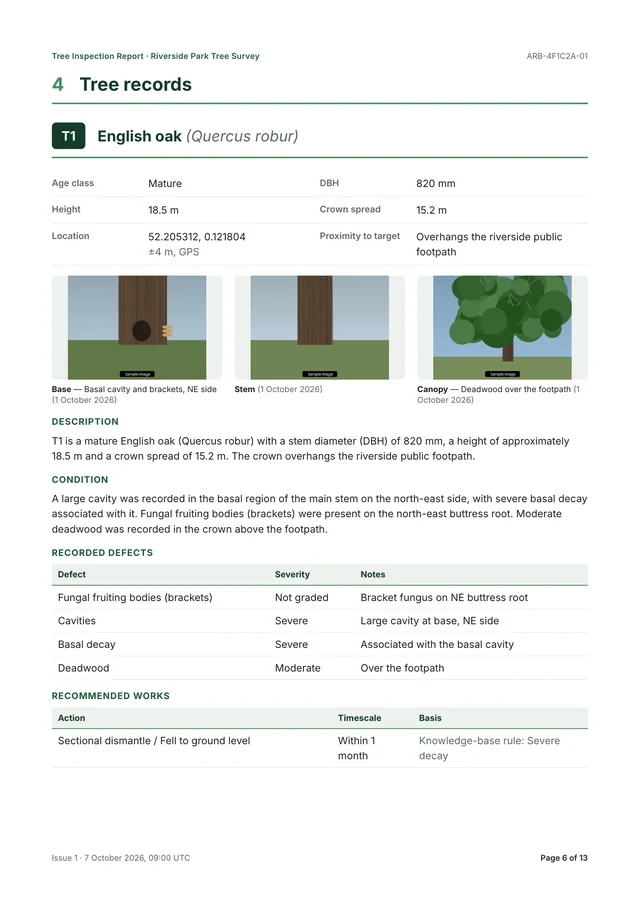
The sample is a real 12-page report generated by ARB-FLO from a fictional survey of six trees: cover, contents, site plan, tree schedule, a record for each tree with its photographs, limitations and the inspector’s declaration.
The sample uses fictional data. Its recommendations have not been independently validated by a professional, and nothing in it means that ARB-FLO or the report is endorsed by any body or meets any standard.
Browse the sample report page by page
What ARB-FLO does not do yet
So you can judge the fit before you ask for a demo:
- Writing up away from a signal. Only field capture works offline; drafting, approval and report generation need a connection.
- Opening an account yourself, or paying online. There is no self-service account or billing; access is arranged with us, currently through the pilot.
- Shared team workflows. ARB-FLO is built around a single inspector’s workflow today.
- Bulk export such as CSV. Reports download as PDF, and the survey data is available through a documented REST API.
- Judgement on your behalf. The AI does not add findings, grade severity, assess risk or propose works, and the arborist remains responsible for every report.
Demo and pilot programme
Request a demo or join the pilot
A demo runs a survey from the first tree to the issued PDF. If you would rather use ARB-FLO on your own surveys, ask to join the pilot programme: we will reply by email and talk honestly about whether it fits how you work.